> For the complete documentation index, see [llms.txt](https://taiphoon-com.gitbook.io/taiphoon.com-docs/llms.txt). Markdown versions of documentation pages are available by appending `.md` to page URLs; this page is available as [Markdown](https://taiphoon-com.gitbook.io/taiphoon.com-docs/ja/firmware/ardupilot/first-setup/frame-type.md).
# フレームタイプの選択
Mission Planner で機体のフレーム構造(Frame Class)とモーター配置の向き(Frame Type)を設定します。
{% stepper %}
{% step %}
### フレーム構造 (Frame Class)
 これは機体全体の「**物理的な形状**」を指します。代表的なものは次のとおりです:
* Copter (マルチローター): クアッド (Quad)、ヘキサ (Hexa)、オクタ (Octa) など。
* Heli: 従来型のシングルローターヘリコプター。
* Plane: 固定翼機。
* Sub: 水中ドローン。
* Rover: 無人車両または無人船。
{% endstep %}
{% step %}
### モーター配置の向き (Frame Type)
フレーム構造(例:Quad)を選択した後、システムに**モーターの配列方向**を指定する必要があります。
これは機体全体の「**物理的な形状**」を指します。代表的なものは次のとおりです:
* Copter (マルチローター): クアッド (Quad)、ヘキサ (Hexa)、オクタ (Octa) など。
* Heli: 従来型のシングルローターヘリコプター。
* Plane: 固定翼機。
* Sub: 水中ドローン。
* Rover: 無人車両または無人船。
{% endstep %}
{% step %}
### モーター配置の向き (Frame Type)
フレーム構造(例:Quad)を選択した後、システムに**モーターの配列方向**を指定する必要があります。
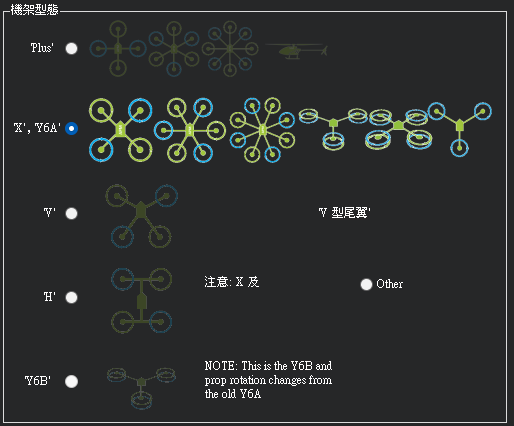 #### 一般的なクアッドの配置
* X モード: 飛行方向が 2 本のアームの中間を向きます。カメラにプロペラが写り込みにくく、飛行特性が最も対称になるため、現在の主流です。
* H モード: 構造は H 字型ですが、モーターのトルク分布に物理的な大きな差がない限り、ArduPilot では通常 X モードとして設定します。
{% endstep %}
{% endstepper %}
## 次のステップ
[加速度センサーのキャリブレーション](/taiphoon.com-docs/ja/firmware/ardupilot/first-setup/accelerometer-calibration.md)
#### 一般的なクアッドの配置
* X モード: 飛行方向が 2 本のアームの中間を向きます。カメラにプロペラが写り込みにくく、飛行特性が最も対称になるため、現在の主流です。
* H モード: 構造は H 字型ですが、モーターのトルク分布に物理的な大きな差がない限り、ArduPilot では通常 X モードとして設定します。
{% endstep %}
{% endstepper %}
## 次のステップ
[加速度センサーのキャリブレーション](/taiphoon.com-docs/ja/firmware/ardupilot/first-setup/accelerometer-calibration.md)