> For the complete documentation index, see [llms.txt](https://taiphoon-com.gitbook.io/taiphoon.com-docs/llms.txt). Markdown versions of documentation pages are available by appending `.md` to page URLs; this page is available as [Markdown](https://taiphoon-com.gitbook.io/taiphoon.com-docs/th/firmware/betaflight/first-setup/ports.md).
# ตั้งค่าพอร์ต
กำหนดฟังก์ชันของแต่ละ UART ในหน้า **Ports** เฟิร์มแวร์ Betaflight ของ Morakot ได้ตั้งค่าพอร์ตที่ใช้บ่อยไว้ล่วงหน้าแล้ว ในการตั้งค่าครั้งแรกเพียงตรวจสอบ **Serial Rx** ตามการต่อสายของตัวรับสัญญาณก็เพียงพอ
## ค่าเริ่มต้น
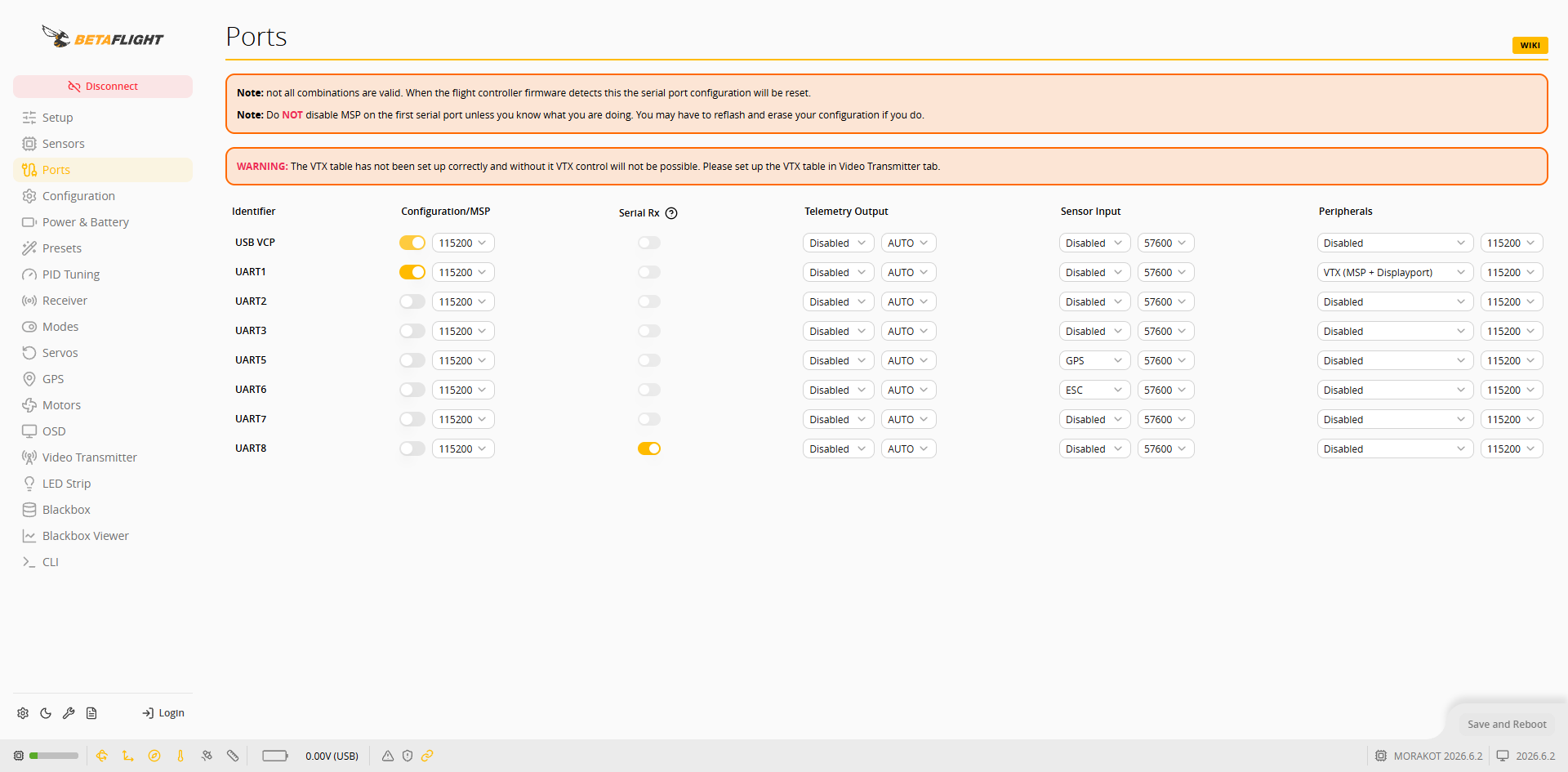 | พอร์ต | ฟังก์ชันเริ่มต้น | การใช้งาน |
| ------- | ------------------------------------------------------- | -------------------------------------- |
| USB VCP | Configuration/MSP (115200) | เชื่อมต่อ Betaflight App |
| UART1 | Configuration/MSP, Peripherals: VTX (MSP + Displayport) | ตัวส่งสัญญาณภาพดิจิทัล (พอร์ต DJI/VTX) |
| UART2 | ไม่ได้เปิดใช้ | — |
| UART3 | ไม่ได้เปิดใช้ | อินพุต S.BUS ของตัวส่งสัญญาณภาพ |
| UART5 | Sensor Input: GPS (57600) | GPS |
| UART6 | Sensor Input: ESC (57600) | เทเลเมทรี ESC |
| UART7 | ไม่ได้เปิดใช้ | สำรองไว้ เปิดใช้เมื่อจำเป็น |
| UART8 | Serial Rx | RC Input (ตัวรับสัญญาณรีโมตคอนโทรล) |
{% hint style="warning" %}
ตามคำแนะนำบนหน้า อย่าปิด MSP ของพอร์ตอนุกรมแรก หากปิดแล้วอาจต้องแฟลชใหม่และล้างการตั้งค่า
{% endhint %}
## ตั้งค่า UART ที่ตัวรับสัญญาณใช้
เมื่อตัวรับสัญญาณต่อกับ RC Input ให้ใช้ UART8 เมื่อสัญญาณจากตัวรับสัญญาณเข้ามาทาง S.BUS ของตัวส่งสัญญาณภาพ ให้ใช้ UART3 ดูตำแหน่งขาได้ที่ [คอนเนกเตอร์ RC ของ Morakot และตารางเทียบพอร์ตอนุกรม](/taiphoon.com-docs/th/products/flight-controller/taiphoon-morakot-flight-controller/rc-port-reference.md)
{% tabs %}
{% tab title="RC Input (UART8)" %}
เมื่อตัวรับสัญญาณ (เช่น ตัวรับสัญญาณ ELRS/CRSF) ต่อกับ RC Input ให้ใช้ค่าเริ่มต้น: **Serial Rx** ของ **UART8** เปิดใช้อยู่แล้ว ไม่ต้องเปลี่ยนแปลง
{% endtab %}
{% tab title="S.BUS ของตัวส่งสัญญาณภาพ (UART3)" %}
เมื่อสัญญาณจากตัวรับสัญญาณเข้ามาทางเอาต์พุต S.BUS ของตัวส่งสัญญาณภาพ (เช่น DJI O4 Pro):
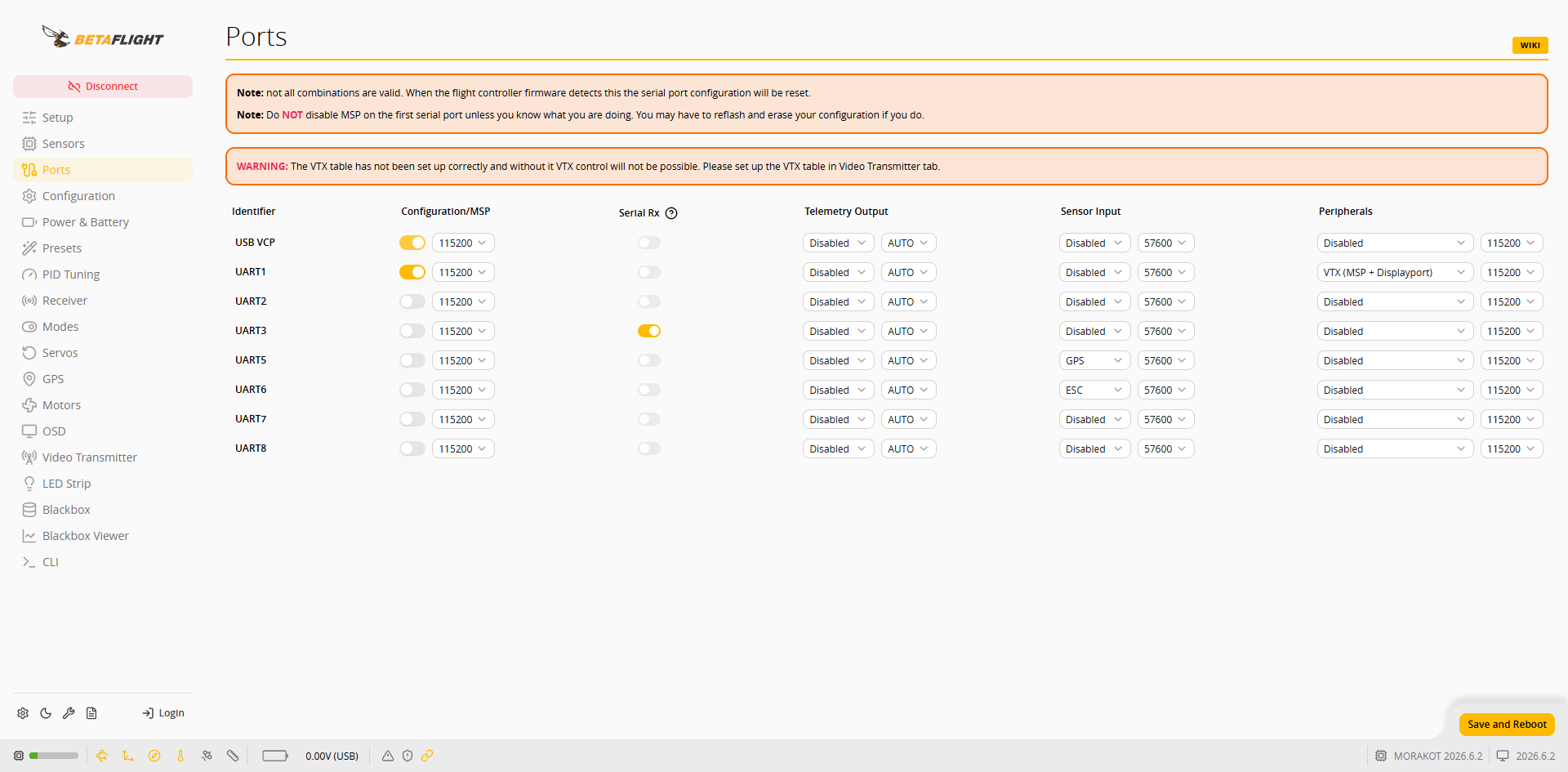
1. เปิด **Serial Rx** ของ **UART3** และปิด **Serial Rx** ของ **UART8** จากนั้นกด **Save and Reboot**
| พอร์ต | ฟังก์ชันเริ่มต้น | การใช้งาน |
| ------- | ------------------------------------------------------- | -------------------------------------- |
| USB VCP | Configuration/MSP (115200) | เชื่อมต่อ Betaflight App |
| UART1 | Configuration/MSP, Peripherals: VTX (MSP + Displayport) | ตัวส่งสัญญาณภาพดิจิทัล (พอร์ต DJI/VTX) |
| UART2 | ไม่ได้เปิดใช้ | — |
| UART3 | ไม่ได้เปิดใช้ | อินพุต S.BUS ของตัวส่งสัญญาณภาพ |
| UART5 | Sensor Input: GPS (57600) | GPS |
| UART6 | Sensor Input: ESC (57600) | เทเลเมทรี ESC |
| UART7 | ไม่ได้เปิดใช้ | สำรองไว้ เปิดใช้เมื่อจำเป็น |
| UART8 | Serial Rx | RC Input (ตัวรับสัญญาณรีโมตคอนโทรล) |
{% hint style="warning" %}
ตามคำแนะนำบนหน้า อย่าปิด MSP ของพอร์ตอนุกรมแรก หากปิดแล้วอาจต้องแฟลชใหม่และล้างการตั้งค่า
{% endhint %}
## ตั้งค่า UART ที่ตัวรับสัญญาณใช้
เมื่อตัวรับสัญญาณต่อกับ RC Input ให้ใช้ UART8 เมื่อสัญญาณจากตัวรับสัญญาณเข้ามาทาง S.BUS ของตัวส่งสัญญาณภาพ ให้ใช้ UART3 ดูตำแหน่งขาได้ที่ [คอนเนกเตอร์ RC ของ Morakot และตารางเทียบพอร์ตอนุกรม](/taiphoon.com-docs/th/products/flight-controller/taiphoon-morakot-flight-controller/rc-port-reference.md)
{% tabs %}
{% tab title="RC Input (UART8)" %}
เมื่อตัวรับสัญญาณ (เช่น ตัวรับสัญญาณ ELRS/CRSF) ต่อกับ RC Input ให้ใช้ค่าเริ่มต้น: **Serial Rx** ของ **UART8** เปิดใช้อยู่แล้ว ไม่ต้องเปลี่ยนแปลง
{% endtab %}
{% tab title="S.BUS ของตัวส่งสัญญาณภาพ (UART3)" %}
เมื่อสัญญาณจากตัวรับสัญญาณเข้ามาทางเอาต์พุต S.BUS ของตัวส่งสัญญาณภาพ (เช่น DJI O4 Pro):
1. เปิด **Serial Rx** ของ **UART3** และปิด **Serial Rx** ของ **UART8** จากนั้นกด **Save and Reboot**
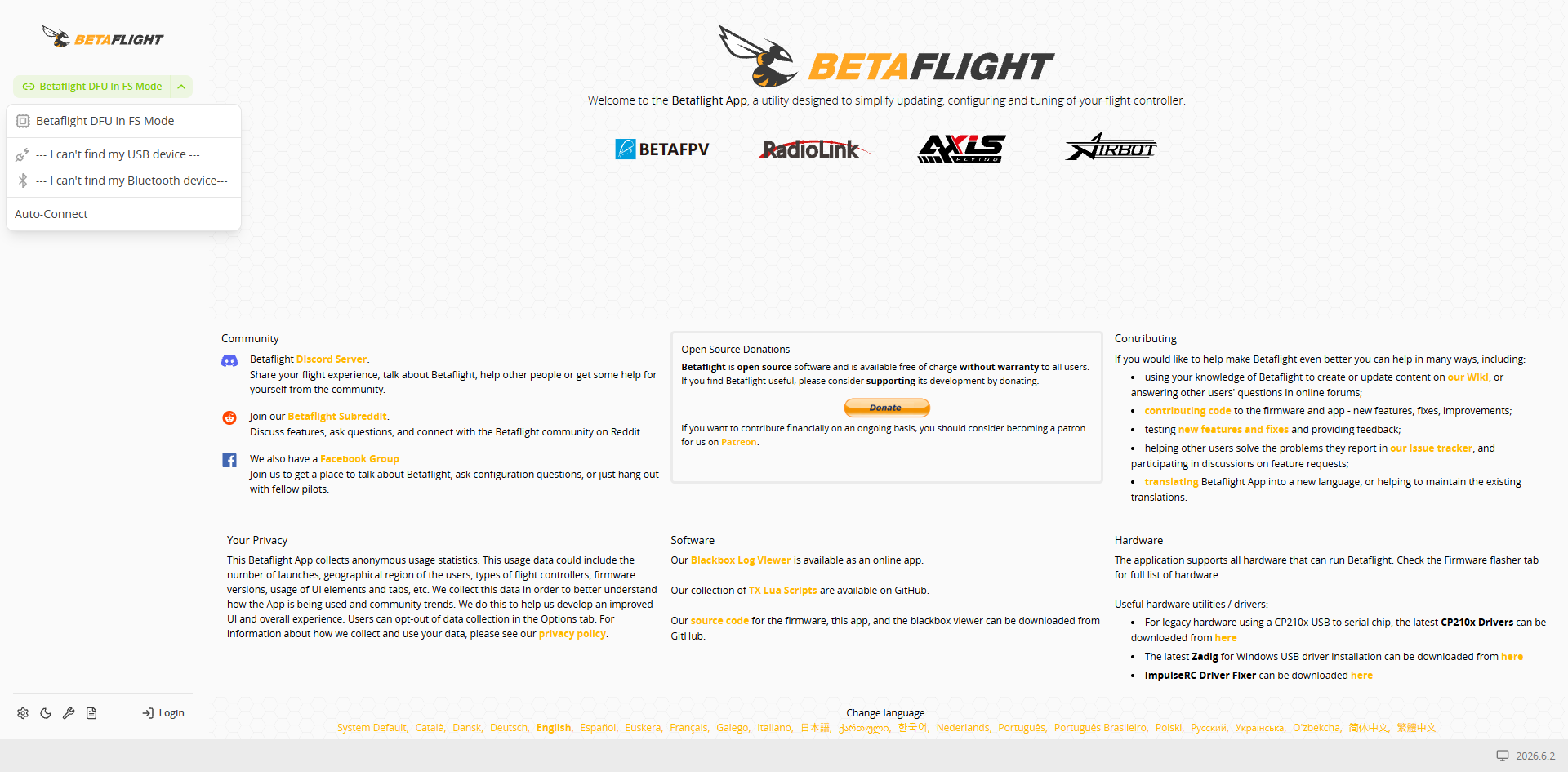
 2. หลังตัวควบคุมการบินรีสตาร์ต App จะกลับไปที่หน้าต้อนรับ เลือกพอร์ตอนุกรมของตัวควบคุมการบิน (เช่น **Betaflight STM Electronics**) จากเมนูพอร์ตที่มุมซ้ายบน แล้วกด **Connect** เพื่อเชื่อมต่อใหม่
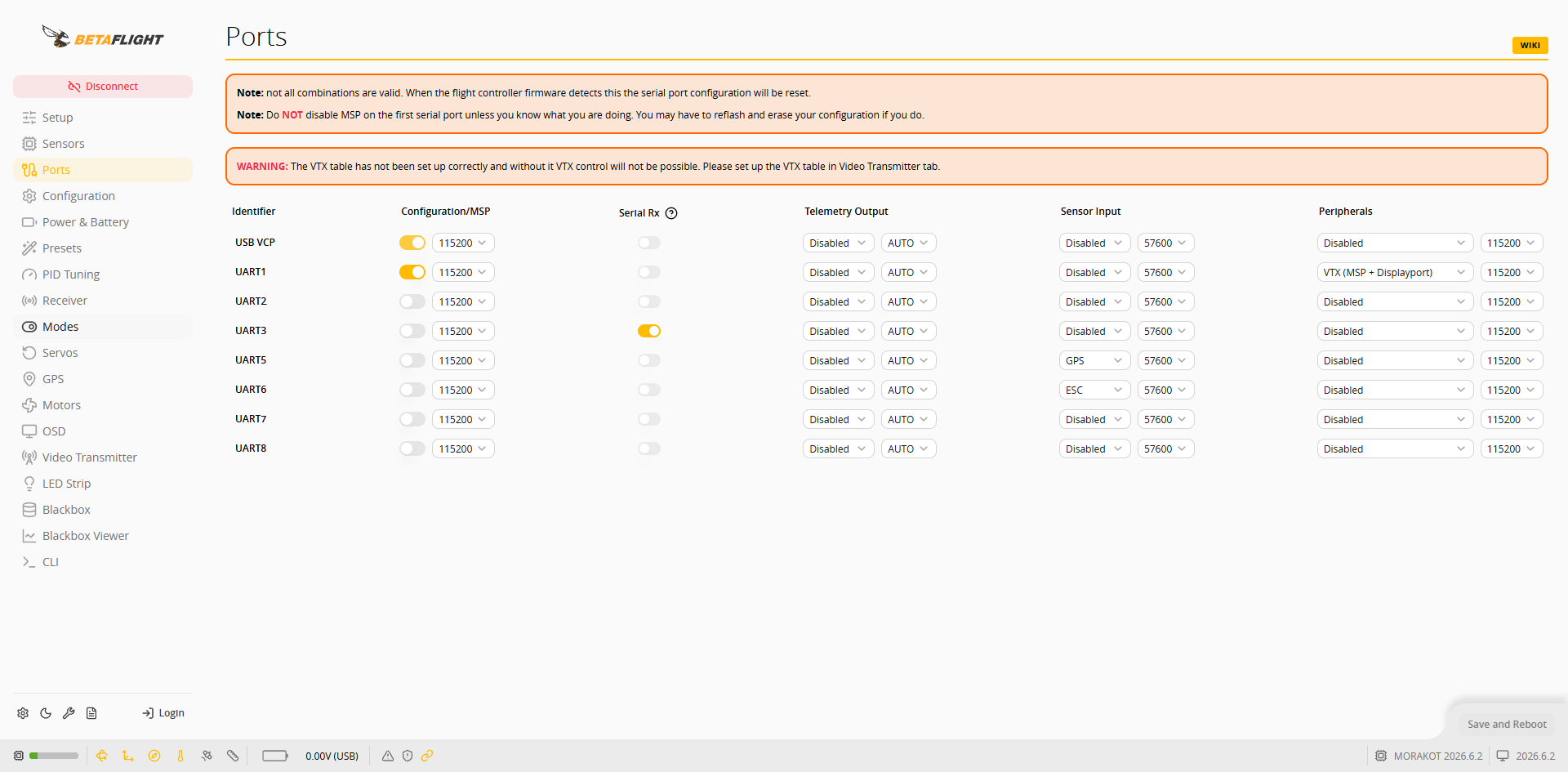
 3. กลับไปที่หน้า **Ports** และตรวจสอบว่า **Serial Rx** ของ **UART3** เปิดใช้อยู่
 {% endtab %}
{% endtabs %}
## การตั้งค่าต่อเนื่อง
เลือกโปรโตคอลที่สอดคล้องกันใน [ตั้งค่าตัวรับสัญญาณ](/taiphoon.com-docs/th/firmware/betaflight/first-setup/receiver.md): ตัวรับสัญญาณ ELRS/CRSF ที่ต่อกับ RC Input ใช้ CRSF ส่วน S.BUS ของตัวส่งสัญญาณภาพใช้ SBUS
{% endtab %}
{% endtabs %}
## การตั้งค่าต่อเนื่อง
เลือกโปรโตคอลที่สอดคล้องกันใน [ตั้งค่าตัวรับสัญญาณ](/taiphoon.com-docs/th/firmware/betaflight/first-setup/receiver.md): ตัวรับสัญญาณ ELRS/CRSF ที่ต่อกับ RC Input ใช้ CRSF ส่วน S.BUS ของตัวส่งสัญญาณภาพใช้ SBUS